How to Save a Video Project and Reopen It with Local Files
By Modisign
- Published
- Updated
- Last tested
To reopen a Studio edit later, save it as a Pro project, open it from your account page or Studio's Open list, then choose your original video and photo files again. The project brings back the edit's structure and settings. It never stores your media or caption text, so keep the original files and plan to regenerate captions after you relink them.
What did we save and reopen?
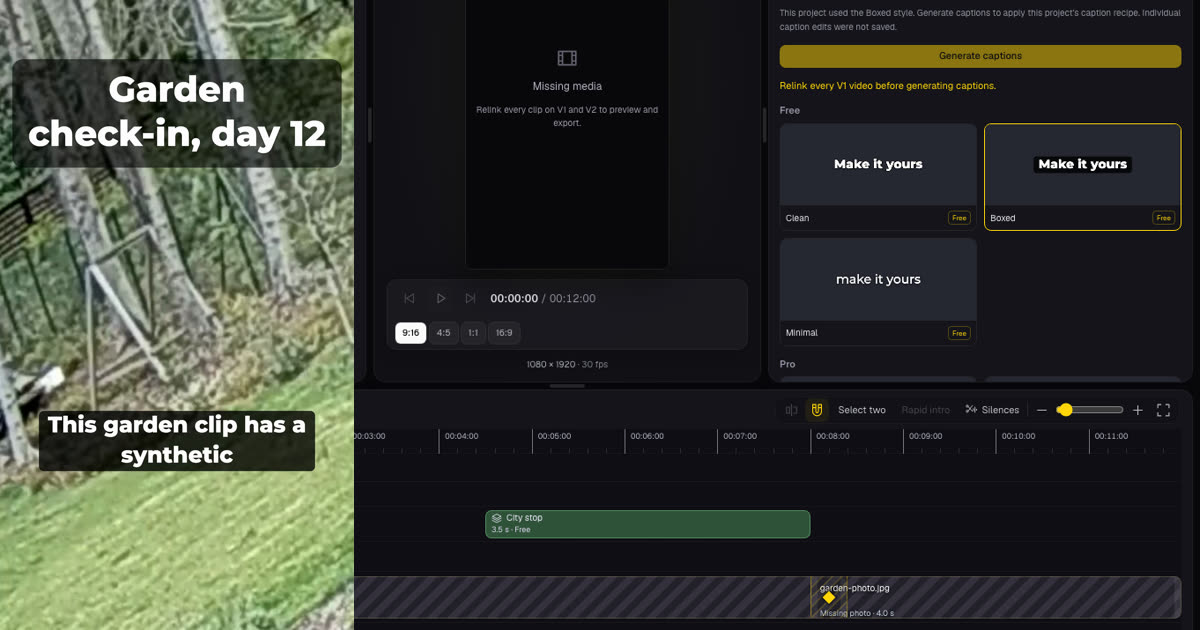
We built a 9:16 edit from a 9-second garden clip and a still photo taken from the same CC0 footage (source). The clip had no sound, so we gave it a synthetic voice for the captions. The edit had a trimmed video, a Fit photo with Slow zoom, a crossfade, a typed title, the unchanged free City stop location tag, a pop sound and Boxed captions. We saved it, closed the tab and opened it in a new one. The right side of the image is the reopened project before relinking; the left is a frame from the MP4 we exported afterwards.
You need a browser, a Google sign-in, Pro and the original files. The pricing page listed Pro at $9 a month plus tax where applicable on October 25, including "Save up to 100 Studio projects". Modisign publishes this guide and sells Pro. Our Pro account was a temporary test account on a local copy of the site.
What does a saved project keep?
| Comes back when you open the project | Stays on your device, never saved |
|---|---|
| Name and output aspect | Your videos and photos |
| Clip order, file names, trims, Fill or Fit, pan, zoom, volume, fades | The caption transcript |
| Photo duration and Slow zoom | Corrected caption words and word styles |
| Transitions between clips | Manual caption line positions and styles |
| Title text, style, position and timing | Sound audio (only the sound's id and settings) |
| Overlay preset, start and full configuration, including its text | Person masks for title effects |
| Sound, start, volume, trim and fades | |
| Caption recipe: style, position and size |
Our whole saved record was under 1 KB. The product rules allow up to 100 projects, 300 clips per project and 64 KiB per project; we did not test those limits. Long title or overlay text counts toward the size.
How do you save and reopen a project, step by step?
- Name the edit. Type a name of 1 to 80 characters in the field at the top of Studio. A dot next to it means unsaved changes.
- Read the notes beside Save. Ours said "Projects save title text, timing, reveal settings and person-effect settings (never masks or pictures)", "Projects save sound settings, no audio" and "Caption edits stay on this device".
- Click Save. The dot disappeared. The account page then listed the project under Studio projects as "Garden check-in test 9:16 · 2 clips · 0:12" with Open and Delete.
- Open it. Use Open on the account page, or Open in the Studio header and pick the project. If your current edit has unsaved changes, Studio first asks "Discard unsaved changes and open Garden check-in test?". Our reopened timeline showed striped clips labelled "Missing media · 8.4 s" and "Missing photo · 4.0 s", Program said "Relink every clip on V1 and V2 to preview and export." and the Export button read "Export · missing media".
- Relink your files. The quickest way is Import with the original files: a file with the same name and kind fills its placeholder without adding a clip. For a renamed file, select the missing clip and click Relink video or Relink photo in the timeline toolbar. With our originals, the trims came back exactly and the status read "All changes saved".
- Regenerate captions. The Captions tab said "This project used the Boxed style. Generate captions to apply this project's caption recipe. Individual caption edits were not saved." The button waits until every V1 video is relinked. New captions came back Boxed, at the bottom, in size L.
- Export. After relinking, our 1080p export was a 1080x1920 H.264 MP4 at 30 fps with stereo AAC, showing the title, captions and overlay where we had placed them.
On a phone-sized screen, tap the project name in the header. With media missing, the menu said "2 clips need their files. Preview and export wait until every clip is relinked." and offered a button to select the first missing clip. We read this in an emulated 390x844 touch viewport, not on a physical phone.
What happens with a wrong or shorter file?
| Situation | What we saw | What to do |
|---|---|---|
| A photo chosen for a video clip | The Relink video picker lists videos only. Forcing a photo gave "garden-photo.jpg can't relink this video clip. Choose a video." and the clip stayed missing | Choose a video, then Remove the failed row |
| A shorter replacement video | The saved 0.30-8.70 s trim became 0.30-5.00 s with a 5-second file; the sequence fell from 12.0 to 8.3 s | Check the clip's end and anything timed after it |
| A renamed file | The clip took the new file's name, and its framing and fades stayed | Rename back, or relink it by hand |
| Any image for a photo clip | The photo kept its 4.0 s, Fit and Slow zoom | Nothing; check the framing |
| Generate captions is disabled | "Relink every V1 video before generating captions." | Relink the remaining videos |
| Caption corrections are gone | Our corrected word reverted to the original transcription | Correct it again after regenerating |
The title and overlay kept their saved start times after the shorter relink. In a longer edit, check that nothing now starts after the end of the shortened sequence.
If you correct many caption words, download an SRT or VTT file before closing the tab as a record of the corrected text. The SRT and VTT guide explains the two formats.
Is a saved project a backup of your videos?
No. Studio reads only files you pick or drop into the page, which is how browsers give web apps access to local files (MDN). A saved project stores settings, not copies. Closing the tab clears the media, and Modisign has nothing to restore.
Other browser editors handle this differently. Microsoft says Clipchamp keeps temporary copies of project media in the browser cache or a temp folder, may ask you to locate files when those copies are cleared, offers an optional content backup in its personal version and stores work-account media in OneDrive or SharePoint (Microsoft Support). Microsoft also says it cannot retrieve originals you have lost. Studio has no cache copy or backup option, so your original files are the backup. For what else Studio keeps local, see editing without uploading.
These habits are suggestions, not test results:
- Keep one folder per project with the files under the names Studio shows on the clips, so one Import relinks them all.
- Don't trim or re-export the originals after saving. A shorter file moves your clip's end.
- Export the finished MP4 when you are done. That file, not the project, is what you post.
Which kind of save do you need?
| You want to | Use | What it keeps |
|---|---|---|
| Continue a Studio edit later | Studio project Save (Pro) | Structure and settings; you relink media |
| Keep the finished video | Export | The MP4 file on your device; Studio exports do not appear in account history |
| Remember a catalog overlay | Bookmark (free with sign-in) | The original preset only, not your edits |
| Edit an overlay download again | Your clips history (Pro overlay downloads) | The overlay configuration, not a Studio edit |
How do you delete a saved project?
On the account page, click Delete beside the project. The dialog said "Delete this project? Garden check-in test will be permanently deleted." with Delete project and Keep. Afterwards the list read "No saved projects yet. Save an edit in Studio to reopen it here." Your files are not affected, because they were never stored. Studio's Open list has a Delete button too; we used the account page.
Is any of this free?
Studio editing and export need only a free Google sign-in. A free account sees a Save link marked Pro that opens the pricing page in a new tab, so the current edit stays open. Under the product rules, nothing in our example would need Pro to export: an unchanged free location tag overlay, Boxed captions, a typed title, a built-in sound, a crossfade and a photo. Changing that overlay's text would make it Pro. The full checklist is in editing a Reel for free, and photo timing is covered in making a Reel from photos and videos. For caption basics, see adding captions for free.
We tested on a desktop with one video and one photo. We did not test saving or relinking on a physical phone, projects with a second video track, motion or title effects, a project whose overlay was later removed from the catalog, or the project count and size limits.
Frequently asked questions
Does saving a Studio project upload my videos?
No. A saved project is a small record of settings: names, trims, framing, transitions, titles, overlay configurations, sound settings and the caption recipe. Our two-clip project was under 1 KB. The videos and photos stay on your device, which is why you choose them again when you reopen it.
What if I no longer have the original video?
Modisign has no copy, so it cannot restore it. You can relink any video to a video placeholder and any image to a photo placeholder. A shorter video keeps your start point where possible and cuts the end at the file's length: our 0.30-8.70 s trim became 0.30-5.00 s with a 5-second file.
Why did my caption corrections disappear after reopening?
Projects save the caption recipe (style, position and size), not the caption text. Studio says so before you save: corrected wording, word edits and manual line positions stay on the device. After relinking, Generate captions applies the saved style to a fresh transcript, so you redo any corrections.
Do I need Pro to save and reopen projects?
Yes. Saving, opening and deleting projects is part of Pro, $9 a month plus tax where applicable, and Pro accounts can keep up to 100 projects. A free account sees a Save link marked Pro that opens the pricing page in a new tab. Editing and exporting in Studio need only a free sign-in.
Related reading


Sources and test details
- The garden test clip and the photo frame taken from it are the uploader's own work (author Sillerkiil), released under CC0 1.0. — accessed
- Clipchamp keeps temporary copies of project media in the browser cache or a temp folder, may ask you to locate files again, offers content backup in its personal version, stores work-account media in OneDrive or SharePoint, and cannot retrieve lost originals. — accessed
- Web applications can access files when the user makes them available with a file input or drag and drop. — accessed
Tested in Modisign Studio Local Modisign site, October 2026 on Desktop Chrome on macOS, temporary Pro test account on the local site: On October 25, built a 9:16 edit from a 9-second CC0 garden clip with a synthetic voice and a photo from the same footage: video trimmed to 0.30-8.70 s with a Fill pan and fade, photo Fit with Slow zoom for 4.0 s, a 0.4 s Crossfade, a typed title, the unchanged free City stop location tag, a Bubble pop sound and Boxed captions at size L, plus one corrected caption word. Saved it (under 1 KB of settings), closed the tab and opened the account page link in a new tab: everything but the media, transcript and corrected word returned, with striped Missing media placeholders, Export disabled and the saved Boxed caption notice. A photo forced into the video placeholder was refused; a 5-second replacement video clamped the trim to 0.30-5.00 s and the sequence from 12.0 to 8.3 s; a same-named photo import relinked automatically and kept 4.0 s. Regenerated captions came back Boxed, Lower, L. The 1080p export was 1080x1920 H.264 at 30 fps, 249 frames, 8.3 s, with stereo 48 kHz AAC. Reopening again and importing the original files restored the 0.30-8.70 s trim and All changes saved; the corrected word did not return. Deleted the project from the account page.
Tested in Modisign Studio Local Modisign site, October 2026 on Emulated 390x844 touch viewport in desktop Chrome, not a physical phone: On October 25, opened the same saved project link: the header showed Export · missing media and the project menu said 2 clips need their files, with a button to select the first missing clip. Did not save, relink or export on the phone layout.
Found an error or a changed control? support@modisign.app.