How to Edit Video Online Without Uploading Your Footage
By Modisign
- Published
- Updated
- Last tested
Yes, you can edit a video online without uploading it to a server if the editor reads your local files and renders on your device. Modisign Studio does this in the browser: sign in with Google, cut your clips, layer animated elements over your footage and download an MP4. The free route has no watermark when all overlays match free presets and any captions use Clean, Boxed or Minimal; the timeline stops at three minutes and export depends on your browser and device.
What do you need to try local browser editing?
Have your local video files, a Google account and a recent desktop browser ready. An overlay is an extra visual layer above your recording, such as an animated title or subscribe reminder.
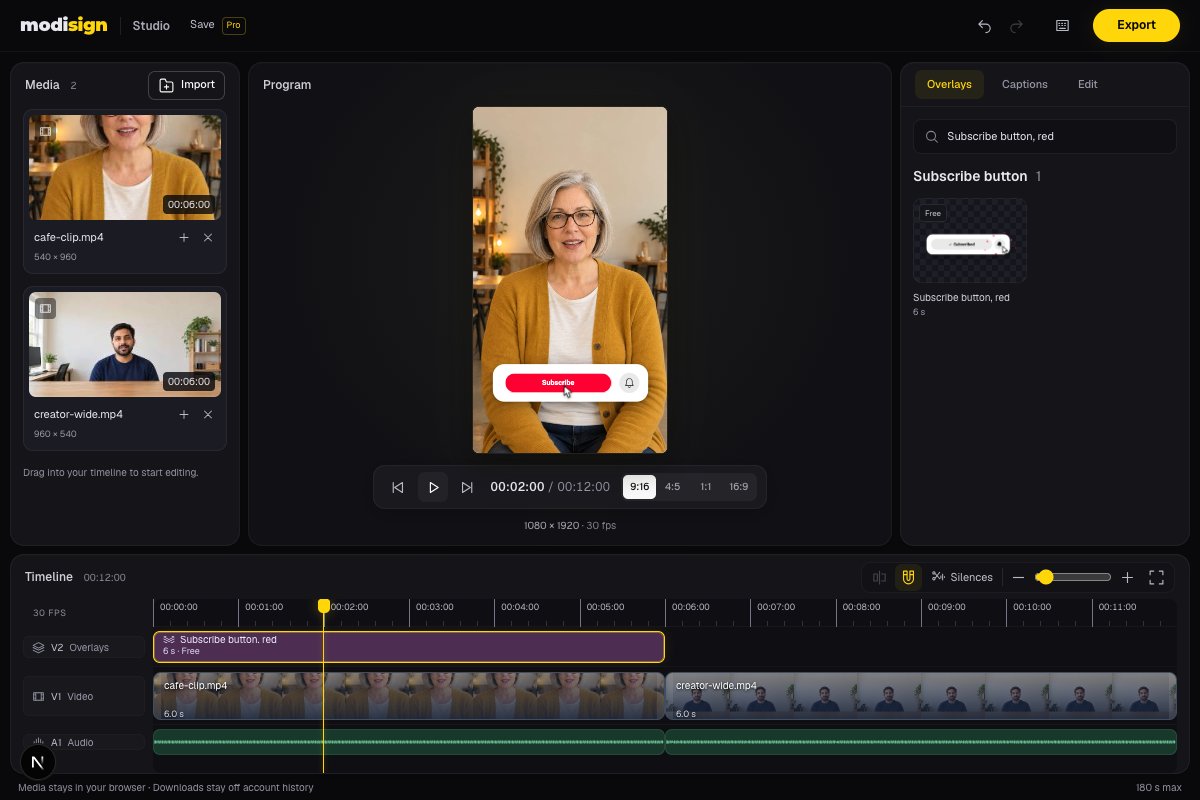
Studio with two local still-based clips of AI-generated fictional creators and the overlay library. The screenshot illustrates a local edit; it is not a competitor or phone test.
The desktop test used local clips with audio and a free subscribe overlay; with Global Privacy Control enabled, request monitoring showed no media upload during editing or export. Export measurements and limits are recorded in Sources and test details. This was not a phone or full three-minute test. Modisign publishes this guide and sells Pro.
How can a website edit a file without uploading it?
The browser’s File API lets a page read files you explicitly select or drop into it, without requiring an upload. MDN File API.
WebCodecs supplies the browser’s video and audio decoding and encoding tools. Decoding turns compressed video into frames; encoding compresses the finished frames again. It supports the frame-level work a browser editor needs, though available codecs vary by browser and device. MDN WebCodecs explanation.
An editor can read your clip locally, draw each frame with its overlay, encode the result and assemble a downloadable file. Chrome’s documentation explains how WebCodecs uses the browser’s existing media tools, often with hardware acceleration, and works with a canvas for drawing frames. Chrome video-processing guide.
Studio keeps video and audio in tab memory and renders the MP4 locally. WebCodecs alone is not a privacy guarantee: other editors can use it and still upload media. Check each product and feature.
Why does keeping footage local matter?
Keeping clip contents local avoids a server copy of an unfinished recording, such as footage of your home or a client draft.
There is no upload wait before editing files already on your device. Rendering still takes work: your computer must decode the clips and encode the result, so local processing does not guarantee a faster export.
Your videos and photos are never uploaded. The site still loads its interface and catalog, and Google sign-in involves a server. Pro projects save the timeline structure and settings, including overlay text, never your media or speech-caption text. Keep the originals and relink them when reopening; Studio explains the workflow. Local rendering does not make Studio an offline app.
What stays local while you edit and export?
Import reads your selected files on the device. Timeline cuts refer to those local clips, and the finished H.264/AAC MP4 is rendered in your browser. Start with a short representative sequence, open the download and check picture and sound before committing to a longer edit. For the actions in order, use the free Reel editing tutorial.
Studio offers 9:16, 4:5, 1:1 and 16:9. Each clip supports Fill with zoom/pan or Fit over a blurred backdrop; inspect its framing after changing aspect. Search the catalog for subscribe-button overlays or hook-title overlays, then select an overlay and open Edit to change its text and styling. A configuration that no longer matches a free preset requires Pro to export.
Studio also generates English captions on your device, with free transcript editing and SRT/VTT downloads. Export is free without a watermark when every overlay configuration matches a free preset and any captions use Clean, Boxed or Minimal. Saving project structure requires Pro at $9/month plus applicable tax, as recorded in our October 10 pricing check.
What limits or problems should you expect?
| Situation | What to check | Next action |
|---|---|---|
| Import or export is unsupported | Your browser must decode the source and encode the output | Try a recent desktop Chrome or Edge and a short representative clip first; other browsers and source formats were not verified here |
| Rendering feels slow | Local processing uses your device’s resources | Close unnecessary heavy apps and try a shorter edit; we did not measure export speed across devices |
| A face disappears from a landscape shot | The clip’s Fill framing | Adjust pan/zoom or choose Fit to retain the whole picture |
| Export asks for Pro | Current overlay tier in Edit and caption style | Reset or replace Pro configurations; choose Clean, Boxed or Minimal |
| The edit approaches three minutes | The finished timeline is capped at 180 seconds | Shorten the sequence or choose an editor for longer work; Pro has the same cap |
| You need to leave the tab | Free edits and media are held in tab memory | Export first; Pro saved projects store structure and require local files to be relinked |
A browser that plays a file may still lack the encoder needed for export. WebCodecs support includes separate encoding and decoding capabilities, with codec availability varying by device. Test the download, not only playback. MDN codec support.
Is Studio the only option for local browser editing?
No. Clipchamp also processes previews and exports locally. Microsoft says its personal version uploads media when you choose content backup or sharing; work accounts back up media automatically to OneDrive or SharePoint. Check those settings if keeping footage local is your priority. Clipchamp autocaptions process audio through Azure, so that feature has different media handling from local preview/export. Microsoft’s autocaption instructions. Microsoft’s media-storage explanation.
Clipchamp’s personal free plan includes AI subtitles and watermark-free exports up to 1080p, with a browser route without required installation. Studio also supports local English captions. Clipchamp plans.
CapCut web also needs no installation and offers captions, text, effects and transitions, but its documented web workflow uploads media into a signed-in workspace. That comparison concerns its browser route, not every desktop or mobile edit. CapCut online workflow.
Choose Studio for a short local edit with built-in animated overlays for Reels, Shorts or TikTok and a watermark-free export when all overlays match free presets and any captions use Clean, Boxed or Minimal. Studio covers English captions locally; choose another editor when you need additional languages, translation or other caption controls. For plain words, another editor’s native text tool is a valid option; ready-made motion is the reason to choose an overlay.
How should you use the overlays?
These are design suggestions: put a hook over spare space in the opening shot, show a step title as the action begins, or place a subscribe reminder after the useful point. Allow the animation to finish and check the text safe-zone guide against your destination preview.
A subscribe graphic is a visual reminder, not a clickable control. Start a free Studio edit with a short export first.
Frequently asked questions
Does using WebCodecs guarantee that an editor will not upload my video?
No. WebCodecs enables local processing, but a website can also upload files. Check the editor’s media handling and the behavior of the features you use. Studio keeps clip contents in tab memory and renders locally; sign-in and Pro project structure still involve the server.
Can I use Studio without signing in or paying?
Google sign-in is required and free. Export is free without a watermark when every overlay configuration matches a free preset and any captions use Clean, Boxed or Minimal. Pro overlay configurations, expressive caption styles and saving projects require Pro. Standalone unchanged free overlay downloads have a separate no-sign-up route.
Will my video edit survive closing or reloading the tab?
A free Studio edit is held in tab memory, so export before leaving. Pro projects save the timeline structure and settings, never your media or speech-caption text. Keep the original files on your device and relink them when reopening a saved project.
Can Studio edit a video longer than three minutes?
The finished Studio timeline is limited to 180 seconds on both plans. Pro does not remove that limit. For a longer project, use an editor designed for longer timelines; this article’s export test covered a seven-second sequence.
Related reading
Sources and test details
- The File API lets a web application read files made available through a file picker or drag and drop; access to a selected file does not itself require uploading it. — accessed
- WebCodecs provides browser-native video/audio encoding and decoding and frame-level processing; supported codecs vary across browsers and devices. — accessed
- WebCodecs exposes media encoders and decoders already present in the browser, often accelerated by hardware; frames can be drawn to or constructed from a canvas. — accessed
- Clipchamp processes previews and exports locally. Personal media leaves the device when content backup or file sharing is chosen; work media is backed up automatically to OneDrive/SharePoint. — accessed
- Clipchamp offers a browser route without required installation; its personal free plan includes AI subtitles and watermark-free exports up to 1080p. — accessed
- CapCut web needs no separate editor installation, but its documented workflow signs into a workspace and uploads media; it offers captions, text, effects and transitions. — accessed
- Clipchamp autocaptions use Azure to process video audio and support multiple selectable languages; local preview/export does not imply local caption generation. — accessed
Tested in Modisign Studio Local Modisign site, October 2026 on Desktop Chrome on macOS: On October 10, confirmed the anonymous Google sign-in gate and current $9/month plus tax pricing. With a temporary local free account, imported two four-second clips with audio, trimmed the portrait clip to three seconds, checked undo/redo, previewed and exported with the free Subscribe button, red preset. Download contained 1080×1920 H.264 video at 30 fps, 210 frames and a seven-second video track, plus stereo 48 kHz AAC; container duration was 7.083 seconds including the audio tail. Inspected exported frames showing the overlay and later centre-cropped landscape clip. With Global Privacy Control enabled, no upload requests were observed during import, editing and export. Separately checked split/undo, four aspect selectors and the Pro overlay export gate. Counted 166 listed catalog presets and checked Newest dates. No full three-minute, phone or competitor export test.
Tested in Modisign Studio Local Modisign site, October 2026 on Desktop Chrome on macOS: October 14: Read two six-second portrait and wide sample clips locally, previewed them in 9:16 and added free Subscribe button, red and Career truth overlays. Downloaded a free 1080×1920 H.264/AAC MP4 at 30 fps, 360 frames and 12 seconds. Also tested photo Fill/Fit and Slow zoom, Crossfade and Dip to black, silence review with one-step undo, 720p output and temporary punch-ins. Free portrait export offers 1080×1920 or 720×1280. No competitor export, phone export, platform upload or full 180-second project was tested. The screenshot uses AI-generated fictional creators in still-based clips, not recorded footage. Look changes palette colors; Layout changes structure.
Found an error or a changed control? support@modisign.app.