How to Write and Animate a Hook Title for a Reel
By Modisign
- Published
- Updated
- Last tested
Write an opening title that names the problem, result or question your footage will actually resolve, then show it as readable text over your own video. Keep one idea on screen, let the animation settle long enough to read, and remove it when the explanation takes over. Native editor text works; a ready-made animated element adds motion, but cannot repair an unclear promise.
How does the freelancing hook sit over the opening shot?
An overlay is an extra visual layer above your recording. Here it carries the opening words, while your footage supplies the explanation.
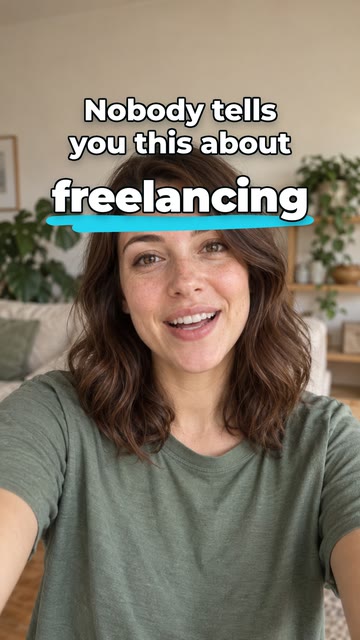
Illustration of the free Career truth preset over sample footage. The illustrative creator footage is not included in the download; this is not a receiving-editor or platform test. The example wording creates curiosity; your video still needs to explain what “this” means.
Have your footage, its opening spoken sentence, and an editor ready. The controls below come from the official documentation listed below; we did not test CapCut, Instagram, TikTok or YouTube.
How do you write and animate the opening title?
Name the payoff before writing the hook. Finish this sentence privately: “After watching, you will understand…” For a freelancing story, that might be why a project overran. Your title should point to that explanation, with footage that supports it.
Replace vague suspense with a concrete premise. Instead of “You need to see this,” try “Why this project ran late.” Instead of “My editing secret,” try “Fix the green edge.” These are original writing suggestions, not tested performance formulas. Use a number only when the video supports it; do not invent a result to make the title sound stronger.
Decide what speech and text each contribute. If you say “I forgot to include revisions,” the title could read “The missing clause.” If your opening sentence already explains the payoff clearly, repeat its short version. The expected result is one coherent message when both are present, and a useful premise when read alone.
Choose native text or a rendered animation. According to CapCut, Text → Add text lets you write directly on mobile or desktop. YouTube documents Text for native Shorts text. Those are valid choices when you need your own wording without a separate asset. CapCut text guide, YouTube editing tips.
For ready-made motion, browse hook-title animations and choose a Free badge. The tested free Career truth configuration downloads unchanged as green-screen H.264 MP4, without sign-up or watermark; Background and Format remain selectable. Use it when its wording fits your subject, or as a render check. Changing its words makes the download a Pro configuration.
Check the title over your footage. Use the overlay format guide to choose green-screen MP4 or desktop transparent WebM and perform a contrasting-background check. Receiving-editor import was not tested here. Judge your opening words once the animation settles, with speech and subtitles present.
Set the readable interval. For native Shorts text, YouTube documents Timeline start and stop points. A rendered title needs its entrance, reading state and exit preserved. Watch the saved opening without pausing and ask whether the footage begins answering the promise as the title clears. YouTube timing instructions.
How many lines are readable, and what should you fix?
My suggestion is to start with one or two short lines, then inspect the actual layout at phone size. That is a design starting point, not a platform limit. The tested preset has three visible text lines in total: a two-line setup plus its emphasized word. A successful render alone does not establish comfortable reading.
| Problem | Check | Suggested fix |
|---|---|---|
| The title could introduce any video | Does it name your specific subject or payoff? | Replace generic suspense with the actual question. |
| The message wraps into a dense block | Phone-size view after the entrance settles | Cut a clause before reducing letter size. |
| Motion finishes just as you understand the words | Whole playback without pausing | Shorten the wording or allow a longer readable interval. |
| Text competes with speech or subtitles | Opening played with sound and then muted | Keep the premise coherent; remove a competing message. |
| Lettering disappears against a bright shot | Brightest and darkest opening frames | Choose stronger contrast or a backing plate. |
These are editorial checks, not compatibility results. W3C’s WCAG contrast reference uses 4.5:1 for ordinary text and 3:1 for large text. Use it when evaluating lettering against its background; a single contrast check does not certify the whole video’s accessibility. W3C contrast guidance.
When should the title appear and disappear?
Show the premise with the opening action, then clear it when the video begins answering. That is my timing suggestion, not a fixed duration requirement for Reels.
TikTok’s 2025 advertising playbook, page 14, organizes its narrative around an opening hook, selling points and a closing call to action. This is ad guidance; it does not establish an organic Reel formula or guarantee retention. TikTok SMB Creative Playbook.
Try these arrangements as design suggestions:
- A spoken story: show “The missing clause” during the setup, then clear it as you explain the revision agreement.
- A practical repair: show “Fix the green edge” over the problem, then remove it before the detailed controls need attention.
- The tested animation: reserve its full 3.5 seconds over suitable opening footage. If the words feel rushed, use a shorter native title rather than assuming every animation must fit your edit.
For placement, use the guide to text clear of platform controls. Keep subtitles and the demonstrated action readable too. Keep labels for later tutorial steps brief and show them when the corresponding action begins.
How do you compare two hook versions?
Make two local edits with the same footage, speech, styling and timing, changing only the title. For the freelancing example, compare “The missing clause” with “Why this project ran late.” The first emphasizes the cause; the second names the problem. Neither is a proven winner.
Show each opening without explaining it first. Ask what the viewer expects the video to answer, whether the words were readable, and whether the next scene fulfilled that expectation. Record those observations. This checks clarity; it is not a controlled platform distribution test, and two public posts with different view counts would not isolate the title’s effect.
For custom wording and styling in the ready-made animation, Modisign Pro is $9/month plus applicable tax and unlocks text, look, colors, size and position for every overlay where supported. This hook-title family has Size, Vertical and Horizontal controls. Anyone can preview custom configurations; downloading them requires sign-in and Pro. To check an unchanged free overlay first, try the free selection; the landing picker does not contain every family.
Desktop also offers transparent VP9 WebM with alpha, the information storing transparency, including for unchanged free presets. Receiving-editor alpha support was not tested here. Read transparent video versus green screen before choosing that route; Modisign supplies the graphic, while your editor combines it with your footage.
Frequently asked questions
Is there a fixed word or line limit for a Reel hook?
This guide establishes no platform limit. Start with one short idea across one or two lines, then check the actual phone-size layout. The tested preset uses two setup lines plus a separate punch word; its successful render does not prove every viewer can read it comfortably.
Should the hook repeat my opening sentence?
Repeat a short sentence when that makes the point easier to follow. Otherwise, let the title name the outcome while your speech supplies the explanation. Keep subtitles available for the spoken words; the hook is a summary, not a replacement for them.
Can I put my own hook into a free Modisign preset?
Free presets download as they are as green-screen H.264 MP4, without sign-up or watermark; Background and Format remain selectable. Custom wording requires Pro for download. Native editor text is an alternative when you need your own words without a customized Modisign asset.
Can I download the hook with a transparent background?
Modisign offers transparent VP9 WebM with alpha, the information storing transparency, on desktop. Unchanged free presets can select it too. Receiving-editor alpha support was not tested here; verify import and the saved composite in your exact editor version before relying on this route.
Does an animated hook guarantee more views?
No. These examples are writing and layout suggestions, not measured growth formulas. Compare whether viewers understand the promise and whether the footage delivers it. A more readable opening does not establish an algorithmic advantage.
Related reading
Sources and test details
- TikTok's 2025 ad playbook, page 14: narrative structure moves from hook to selling points to a call to action; this is ad guidance, not an organic Reel rule. — accessed
- YouTube: native Shorts Text tool, Timeline start/stop controls for text clips, and review before publishing. — accessed
- CapCut: Text/Add text on mobile and desktop, mobile Overlay/Add overlay, desktop higher-track layering and combined-video export. — accessed
- W3C WCAG 2.2 contrast reference: 4.5:1 for ordinary text and 3:1 for large text. — accessed
Tested in Modisign modisign.app, October 2026 on Desktop browser: On October 8, 2026, exported the unchanged free Career truth preset with default Green screen: 1080×1920 H.264 MP4, 30 fps, 105 frames, 3.5 s. We checked the file; a frame at 2 seconds showed a two-line setup and freelancing below it with a cyan underline on green. No receiving-editor import or platform test was performed.
Tested in Modisign Local Modisign site, October 2026 on Desktop Chrome on macOS: October 14: Checked the Career truth illustration and corrected its free link to include the saved text styling. Reviewed the hook placement and layout labels. Look changes palette colors; Layout changes structure and palette changes preserve wording and placement. Missing catalog images prevented the editor from loading, so no new export or receiving-editor test was completed. Earlier export measurements retain their original dates.
Found an error or a changed control? support@modisign.app.