How to Mix Fonts and Style Single Caption Words in Studio
By Modisign
- Published
- Updated
- Last tested
To use different fonts in video captions, generate and correct English captions in Modisign Studio, open Captions, choose Mixed, then pick a Creator or Editorial trio, a palette and Reroll. Restyle a single word with the Word style controls. Preview and editing are free after Google sign-in. Exporting Mixed, or any hand-styled word, needs Pro. SRT and VTT downloads carry words only.
What does a mixed-font caption look like?
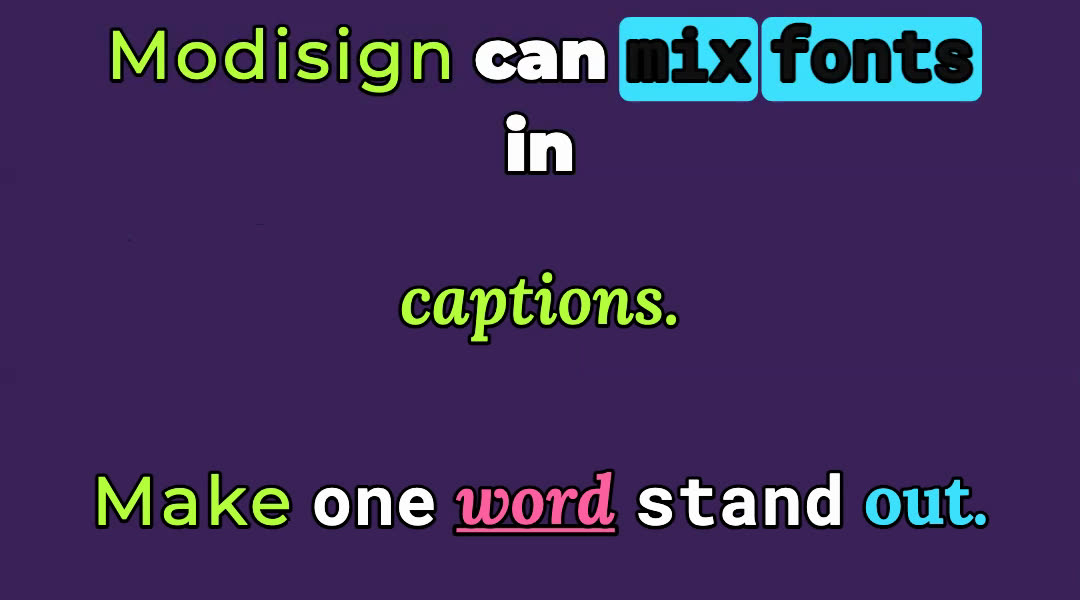
The image stacks crops of three frames from one export: the first line, the second line and the third line. The speech is a synthetic text-to-speech clip over a plain gradient, so the lettering is easy to see. In the last frame we restyled word by hand (Lora, weight 700, italic, pink, underlined); every other word keeps the look that Mixed drew for it. We exported in a simulated Pro session on the local development site and made no real payment.
You need a local video with English speech, a free Google account for Studio and a desktop browser. The first caption run downloads a speech model of about 43 MB, which Studio caches in your browser. Your video, audio and caption text are not uploaded.
How do you mix fonts and restyle one word?
Generate and correct the transcript first. Import the clip (in an empty timeline it joins V1 by itself), open Captions and click Generate captions. Our clip came back as "Modison can mix fonts and", "captions." and "Make one word stand out." We fixed the first line to "Modisign can mix fonts in" in its transcript field and pressed Enter. Styling cannot repair a wrong word, and the free caption workflow covers corrections in more detail.
Click Mixed in the Pro group. Each word now gets its own font, weight and color from a seeded recipe, drawn from three bundled families: Montserrat, Lora and Roboto Mono.
Pick the Mix, Palette and Reroll. Under Mix, choose Creator trio or Editorial trio. Under Palette, choose one of four sets: "Cream, yellow, pink", "White, cyan, lime", "Ivory, gold, coral" or "White, lilac, mint". Reroll draws a new look for every word. In our check, each Reroll changed the preview picture.
Set Position and Size. Choose Upper, Center or Lower and S, M or L. We used Center and L so the words fill the width.
Select the word to emphasize. In the Word style block, click a word chip, or use Previous word, Next word, Add next word and Select line. In the transcript, the Aa button next to a line opens that line's words. The status line confirms "Selected: word".
Change its look. Choose Font, a Weight that family offers, Italic (Lora only), a Color, Tracking, Line spacing, Underline or Highlight. Compare the word with its neighbors in the preview before moving on.
Undo cleanly. Reset word clears the selected word. Reset all word edits, also shown beside Reroll as Reset word edits, clears every hand-styled word and leaves the Mixed recipe alone.
Export and inspect. On a free account the Export dialog explains that styled words and expressive caption styles need Pro. With Pro, choose 1080p or 720p and click Export MP4. Play the downloaded file and check each line.
On a narrow screen, below 1024 px, the same tools sit in a Captions sheet with the sections Text, Style, Words, Layout and More. Mixed, Mix, Palette and Reroll are under Style; the word chips and controls are under Words. We checked these labels in an emulated 390×844 touch viewport in desktop Chrome, which is not a phone test, and did not export from it.
Which options does the Word style block offer?
| Control | Choices | Notes |
|---|---|---|
| Font | Montserrat, Lora, Roboto Mono | Three bundled families, no uploads |
| Weight | Montserrat 500, 700, 800, 900. Lora 400, 600, 700. Roboto Mono 400, 500, 700 | Changing family keeps the weight when the new family has it |
| Italic | Lora only | A toggle that appears only for Lora |
| Color | Mix palette swatches, shared swatches, custom picker | Palette swatches appear first when Mixed is on |
| Tracking, Line spacing | Sliders with number fields | More line spacing on a word opens its whole row |
| Underline, Highlight | Toggles | Highlight adds a Highlight color choice |
Word looks are keyed to the media and the source word, not to a position on the timeline. If two clips use the same source file, they share the word styles, as they share transcript edits.
What is free and what needs Pro?
| Action | Account needed | Cost |
|---|---|---|
| Generate, correct and preview captions | Free Google sign-in | Free |
| Clean, Boxed or Minimal export with no styled word | Free Google sign-in | Free |
| Download SRT or VTT | Free Google sign-in | Free |
| Export Mixed or any other expressive style | Pro | $9 per month plus tax |
| Export any effective hand-styled word, even over Clean | Pro | $9 per month plus tax |
We tested the gate on a simulated free account. With Clean and no edits, Export offered Export MP4. After we set one word to Lora, Export showed "Pro overlays and captions" with See Pro. Reset all word edits brought the free export back, and choosing Mixed brought the Pro prompt even with no word edited. Overlay configurations are separate: a Pro overlay still makes the whole export Pro. The word-by-word style guide lists all fourteen styles.
What do SRT, VTT and saved projects keep?
Download SRT and Download VTT are under the Captions panel (More on a narrow screen). They hold words and times only. This is the SRT from the test, after correction:
1
00:00:00,000 --> 00:00:01,560
Modisign can mix fonts in

2
00:00:01,560 --> 00:00:02,340
captions.

3
00:00:02,980 --> 00:00:04,242
Make one word stand out.
The VTT file had the same three cues with a WEBVTT header and periods in the times. See SRT vs VTT for choosing a format. No font, color, underline or highlight is in either file, so styling exists only in the exported video.
Pro Save stores the Mixed recipe (preset, seed and palette) with the caption settings. It does not store the transcript or individual word edits, which Studio's note under the word controls also says. We did not test Save. After reopening a project, generate captions again and restyle the words you want.
When do mixed fonts help or hurt?
CapCut's own caption guide lists inconsistent styling among common mistakes and advises one font, color, size and background across all captions, while also offering ready-made caption templates such as Glow and Trending. CapCut caption template guide. Mixed deliberately breaks the uniformity rule, so use it where expression matters more than a quiet read. These are design suggestions, not measured results:
- Emphasis: style one word per line, such as the noun the sentence is about, and leave the rest in the Mixed recipe.
- Contrast: choose the palette against your actual footage, then play the clip muted at phone size. Pale lettering over a bright shot fails.
- Short lines: Mixed suits a hook or a short quote. For a long explanation, a free Clean or Boxed caption is easier to read, and you keep a free export.
If an opening title is separate from captions, try a hook title overlay and check both together. A free preset stays free only when unchanged.
What does this not do?
Studio recognizes English speech only, offers three bundled font families and cannot upload fonts. A style applies to a whole word, not single letters. We did not test noisy recordings, a real Pro account or a posted video. Mixed fonts can slow reading, so test the longest line before posting.
Frequently asked questions
Can I use my own font files in Studio captions?
No. Caption words use three bundled font families: Montserrat, Lora and Roboto Mono. Studio has no font upload. Pick a family, then a weight that family offers; only Lora also offers italic.
Are mixed-font captions free to export?
No. Mixed is one of the eleven Pro caption styles, and so is any hand-styled word, even over Clean, Boxed or Minimal. Generating, correcting, previewing and downloading SRT or VTT stay free after Google sign-in. Reset all word edits and choose Clean, Boxed or Minimal to export free.
Do SRT and VTT files keep the fonts and colors?
No. The files Studio downloads hold timed text only: cue numbers, times and the corrected words. Fonts, colors, underline and highlight exist only in the exported video.
Does a saved project keep my word styling?
Pro Save keeps the caption recipe, meaning the Mixed preset, seed and palette. It does not keep the transcript or individual word edits, so restyle those words after reopening a project and generating captions again.
Does Studio caption languages other than English?
Not yet. Caption generation runs on your device for English speech only. Corrections you type stay in the open tab.
Related reading


Sources and test details
Tested in Modisign Studio Local Modisign site, October 2026 on Desktop Chrome on macOS, 1440 px wide window: On October 23, imported a 4.24-second synthetic English speech clip (macOS text-to-speech over a plain gradient, 720×1280) and generated captions on a simulated free account. Recognition returned Modison can mix fonts and / captions. / Make one word stand out.; corrected the first line to Modisign can mix fonts in. With Clean selected and no word edits the Export dialog offered Export MP4. After restyling one word in Lora it showed the Pro prompt, Reset all word edits brought the free export back, and Mixed with no hand edits also showed the Pro prompt. Pressed Reroll twice and switched to Editorial trio: the preview picture changed each time, and returning to Creator trio reproduced the second Reroll picture. Downloaded SRT and VTT: three cues of plain text, no styling. In a simulated Pro session on the local development site selected Mixed, Creator trio, the White, cyan, lime palette and size L, restyled the word word (Lora 700, italic, pink, underline) and exported a 1080×1920 H.264 MP4 at 30 fps, 4.23 seconds, with AAC audio. Inspected frames at 0.8, 1.95 and 3.6 seconds; the article image stacks crops of those frames. Did not test Pro Save, a real payment or a posted video.
Tested in Modisign Studio Local Modisign site, October 2026 on Emulated 390×844 touch viewport in desktop Chrome, not a physical phone: On October 23, generated captions on a simulated free account and read the phone Captions sheet: sections Text, Style, Words, Layout and More; Mixed with Creator trio, Editorial trio, Palette and Reroll under Style; the word chips and Font, Weight, Color, Tracking, Line spacing, Underline, Highlight, Reset word and Reset all word edits under Words; Download SRT and Download VTT under More. Did not export from the phone layout.
Found an error or a changed control? support@modisign.app.