How to Add Click and Whoosh Sounds to a Reel in Studio
By Modisign
- Published
- Updated
- Last tested
To add click and whoosh sounds to a Reel, open Modisign Studio, build your edit, then use the Sounds tab: place any of ten free built-in effects by hand, or let Suggest sounds propose one for each title, configured crossfade or dip, and overlay tap. Nothing is applied until you review it. These are short effects only: no music bed, no imported audio, no ducking.
What did we build, and what does it show?
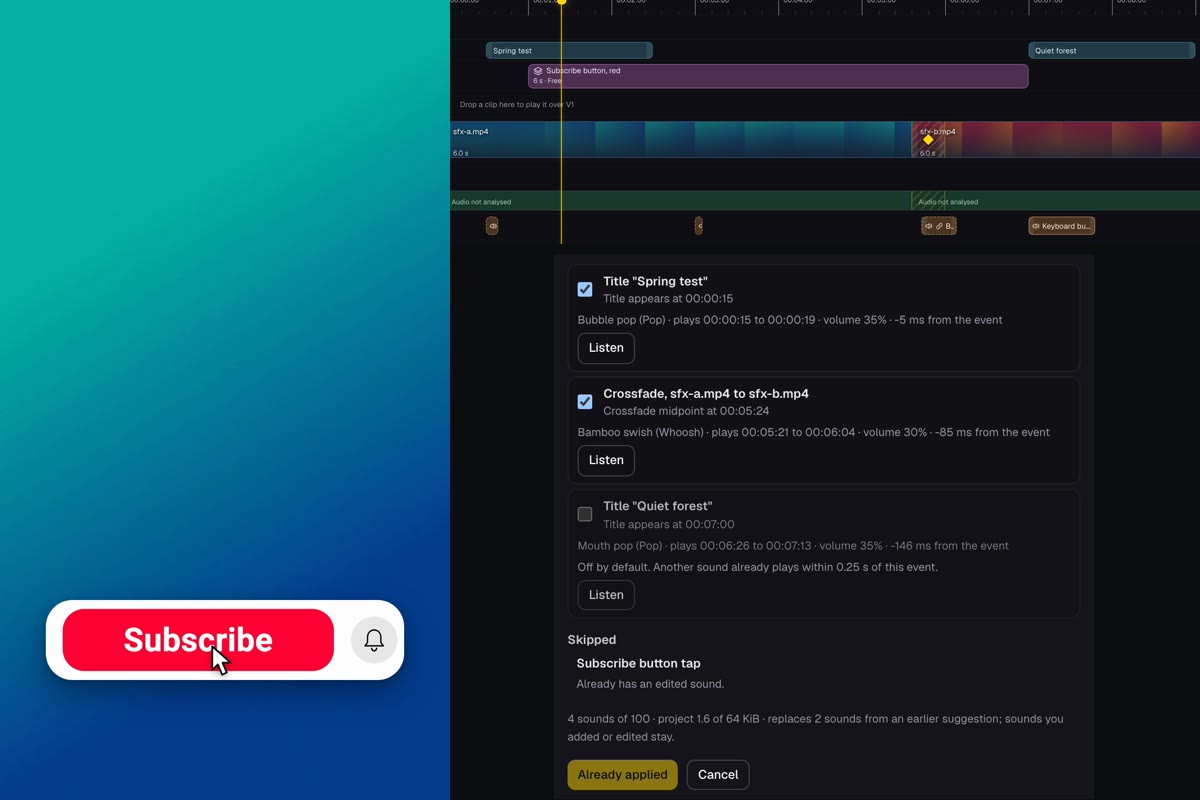
On October 23, 2026, we made an 11.6-second test edit on a free Studio account: two generated gradient clips with synthetic speech, a 0.4-second Crossfade between them, two native titles and the unchanged free red Subscribe configuration. The left half of the image is a frame from the export at 3.0 seconds, when the overlay's cursor taps the button. The right half is the SFX lane and the review.
Studio needs a free Google sign-in. Your video and the sounds stay in your browser tab.
How do you add the sounds, step by step?
- Build the picture first. Import your clips. In an empty timeline they join V1 in the order you pick them; files you import later wait in the Media bin, where each clip's plus button adds it. Click the diamond between two clips and choose Crossfade or Dip to black. Add a title under Text, then Add title at playhead. Sounds attach to this structure.
- Open the Sounds tab. On a phone-sized layout use More, then Sounds. The list shows ten sounds with their length and a Free badge. The category chips are All, Click, Typing, Whoosh, Pop and Sparkle.
- Use Listen before you add. Listen plays the sound through Studio's preview audio. In our test it added nothing, left the playhead where it was and created no undo step.
- Place one by hand. Move the playhead, press Add at playhead, and edit the selected sound. Timing offers Start, ±1 frame, Start at playhead, Sound start and Sound end. Volume offers Volume, Mute, Fade in and Fade out. We placed Keyboard burst at 7.0 s under the second title, ended it at 0.8 s, set volume 0.25 and a 0.15 s fade-out. On the phone layout a selected sound shows Back, Sound, Timing, Volume and Delete.
- Open Suggest sounds. Tick the events, choose Subtle or Normal, and pick the title sound: Pop, Typing or Sparkle. Reroll variants can swap a row to the other sound of its category. Each row has its own Listen button and checkbox.
- Review, then Apply. The button reads, for example, "Apply 3 sounds". It adds all ticked rows as one step, and one Undo removes them. Our Undo and Redo each moved all three at once.
- Export. Click Export, then Export MP4. The video length follows your footage, not the sounds.
Event times in the review use minutes:seconds:frames, so 00:05:24 is 5 s and 24 frames, or 5.8 s.
Which sound goes with which moment?
| Category | Sounds (length) | What Suggest sounds uses it for |
|---|---|---|
| Click | Interface click (97 ms), Mouse click (56 ms) | Overlay taps |
| Typing | Keyboard burst (3.8 s), Single mechanical key (313 ms) | Key presses use Single mechanical key; Typing is also a title option |
| Whoosh | Bamboo swish (426 ms), Air sweep (1.68 s) | Crossfade midpoints and dip cut points |
| Pop | Bubble pop (149 ms), Mouth pop (588 ms) | Title entrances (default) |
| Sparkle | Cartoon sparkle (638 ms), Magic chime (1.95 s) | Title entrances, if chosen |
Only the Subscribe overlay was in our edit. Suggest sounds uses only overlays that declare a tap or key-press moment; overlays without one are listed under Skipped, so a comment card gets no automatic click.
What does Suggest sounds skip, and why?
It proposes only for three kinds of event, and it explains what it leaves out:
- Hard cuts get nothing. Only a configured Crossfade or Dip counts.
- A nearby sound wins. Our second title shared its start with the manual typing sound, so its row was Off by default with "Another sound already plays within 0.25 s of this event."
- Edited sounds are yours. After we raised the tap's volume to 0.5, the tap moved to Skipped as "Already has an edited sound." A later Subtle apply said it "replaces 2 sounds from an earlier suggestion; sounds you added or edited stay."
Where did the sound energy land in the export?
We exported the final edit twice, with and without sounds, decoded both audio tracks and subtracted one from the other. This shows what the sounds added; it is a measurement, and nobody listened to it.
| Event | Event time | Sound and volume | First audible, peak time | Peak level |
|---|---|---|---|---|
| Title appears | 0.50 s | Bubble pop, 25% | 0.500 s, 0.502 s | -13.4 dBFS |
| Subscribe tap | 3.00 s | Interface click, 50% (edited) | 3.000 s, 3.001 s | -7.5 dBFS |
| Crossfade midpoint | 5.80 s | Bamboo swish, 21% | 5.737 s, 5.798 s | -18.5 dBFS |
| Manual typing | 7.00 s | Keyboard burst, 25% | 7.071 s, 7.464 s | -24.8 dBFS |
The synthetic speech peaked at -2.8 and -2.4 dBFS; the edited click was the loudest effect, 4.7 dB under the first speech peak. The difference was digital silence from 3.4 to 4.6 s and after 8.2 s, and -68 dBFS from 1.4 to 2.8 s. In an earlier pass, the 1.68-second Air sweep became audible about 0.7 s before the crossfade midpoint and peaked about 0.27 s before it, so check a long whoosh; use Reroll variants or the Timing offset.
How should you place them? Three suggestions
- Title: a Pop on the entrance, at Subtle first. A sound that starts a few milliseconds early still reads as one event.
- Tap: the click belongs on the cursor's landing frame, which the cue already marks. Keep it under the voice.
- Cut: a short whoosh over a dissolve; skip it on hard cuts and after pause removal, where a hard cut is the point.
For transitions between photos and clips the same whoosh rule holds. For the title itself, see the hook title guide.
What are the limits, licence and Free/Pro rules?
The ten sounds are third-party recordings released under CC0: two from Kenney, eight from Freesound uploads, with credits listed voluntarily in the sound notice. Creative Commons states it has not verified the copyright status of any work under CC0, and Modisign does not clear third-party claims, including an automated match on a platform.
Sounds do not make an export Pro. A Studio export is free only when every overlay equals a free preset with no non-identity overlay motion key, captions are absent or use only Clean, Boxed or Minimal (globally, on every line and in any Scatter style pool) with no manually styled word (Reset all word edits clears them), and no title reveal or person effect is set; the free Subscribe overlay qualifies unchanged. Pro Save keeps sound ids, timing, volume and links, never audio. The Modisign MCP offers the same sound requests to an assistant.
Compare the alternative honestly. CapCut documents a sound-effect library you browse by category or search, with an AI generator that analyzes motion, transitions and scene changes. Studio has ten sounds and rules based on your edit's structure. Pick CapCut for breadth; use Studio when a few short effects tied to your titles, taps and dissolves are enough. Start in Studio.
Frequently asked questions
Are the Studio sound effects free?
Yes. The ten built-in sounds are free for every signed-in Studio user, and adding them does not change whether an export is free. The export is still free only when its overlays, overlay motion keys, captions (including any caption line set to an expressive style and any manually styled word) and title effects meet the free rules. A Pro project saves sound ids and settings, never audio.
Can I add my own audio file or a music track?
No. The Sounds tab offers only the ten built-in short effects. It has no audio import, music bed, ducking or limiter. The audio of your own video clips stays in the export as you set it with volume, mute and fades.
Does Suggest sounds listen to my video or look at the picture?
No. It reads your edit's structure: titles appearing, crossfades and dips you configured, and taps or key presses declared by an overlay. It does not analyze speech or pictures, and a plain hard cut gets no suggestion.
Will these sounds be safe from copyright claims?
Not guaranteed. The recordings are third-party releases under CC0, credited in the sound notice, but Modisign does not clear third-party claims and an automated system on a platform can flag even a short sound by mistake.
Did you listen to the exported video?
No. The test ran in an automated browser, so we compared the exported audio with a copy exported without sounds and report where the added energy lands. Play the export yourself on the device where it will be heard.
Related reading


Sources and test details
- CC0 1.0 deed: the person who associated a work with CC0 dedicates it to the public domain, and you can copy, modify, distribute and perform it, even commercially, without asking permission. Creative Commons states it has not verified the copyright status of any work to which CC0 has been applied and makes no warranties about a work. — accessed
- CapCut's page documents a sound-effect library browsable by category or search, placement from the Audio tab by plus button or drag, volume, speed, pitch and fade controls, and an AI sound effects generator that analyzes motion, transitions and scene changes. It also tells users to review the current licence terms of the specific asset before commercial use. — accessed
Tested in Modisign Studio Local Modisign site, October 2026 on Desktop Chrome on macOS, automated 1440 by 1250 window: On October 23, with a simulated free signed-in session on the local development site, imported two generated 6-second 9:16 clips with synthetic speech, joined them with a 0.4-second Crossfade, added the titles Spring test (0.5 s) and Quiet forest (7 s) and the unchanged free Subscribe button, red overlay at 1.0 s, whose tap cue lands at 3.0 s. Listen played a sound without adding it, moving the playhead or creating an undo step. Added Keyboard burst at 7.0 s by hand, trimmed it to 0.8 s, set volume 0.25 and fade-out 0.15. Suggest sounds proposed a title, the crossfade and the tap; Apply added the rows as one undo step, Undo removed them and Redo restored them. After editing the tap sound's volume, the tap appeared under Skipped as Already has an edited sound and a Subtle reapply replaced two suggested rows and kept the edited and manual ones. Exported twice on the free account, with and without sounds: both MP4 files were 1080 by 1920 H.264 at 30 fps with stereo 48 kHz AAC audio and an 11.6-second duration. No Pro prompt appeared. Decoded both audio tracks and compared them: sound energy started within one frame of the title, tap and crossfade midpoint and was silent away from the events. No person listened to the result; this is a measurement.
Tested in Modisign Studio phone layout Local Modisign site, October 2026 on Emulated 390 by 844 touch viewport in desktop Chrome, not a physical phone: On October 23, opened More then Sounds, which showed a sheet titled Sounds with the ten sounds, category chips and Suggest sounds. The Suggest sounds sheet listed a title and a crossfade, Apply 2 sounds added them as one history step and Undo removed both. Did not export from the phone layout and did not test iPhone, Android or Safari.
Found an error or a changed control? support@modisign.app.