How to Add a Short Countdown Before a Video Reveal
By Modisign
- Published
- Updated
- Last tested
To put a countdown before a reveal, open the free Wait for it countdown, add your clip under Your video and set Overlay starts at to the reveal time minus 3 seconds. The card counts 3, 2, 1 and shows 0 about 2.98 seconds after it starts. It is a 3.6-second graphic, not a live timer of any length.
What does the tested countdown look like?
A countdown overlay is an animated card that plays on top of your footage. Modisign's Countdown card counts down to a zero, then disappears. Timing it so zero lands exactly on the reveal is the whole trick.
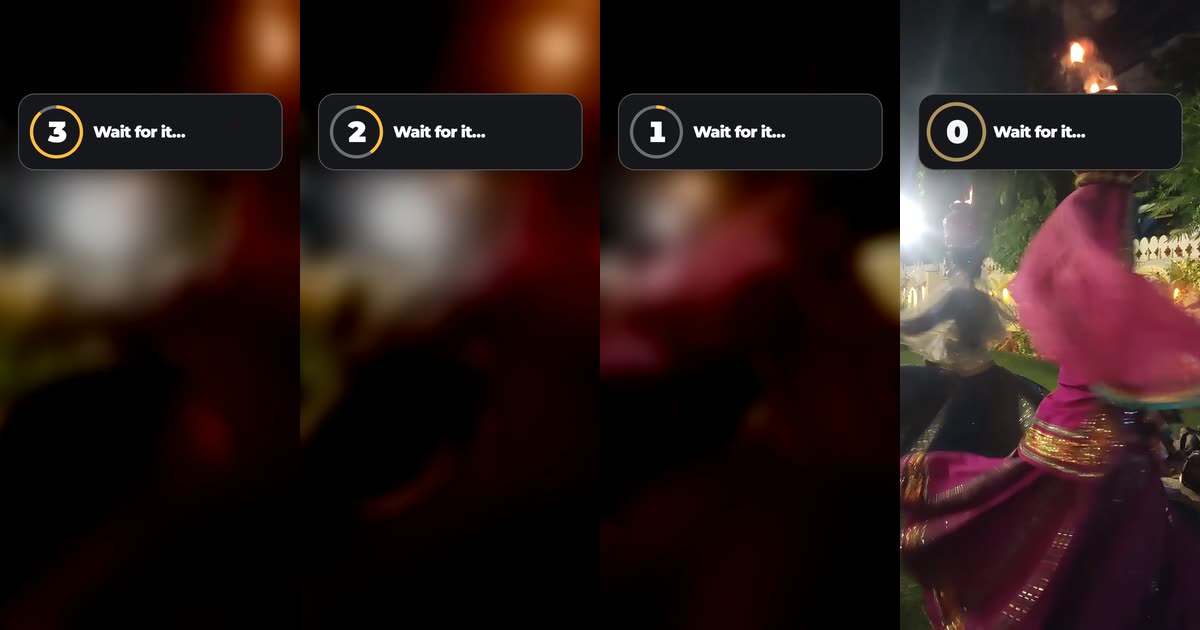
These are four frames from the downloaded MP4 at 1.67, 2.93, 3.83 and 4.03 seconds. The footage is a CC0 dance clip by its uploader (source). To get a reveal with an exact frame, we gave it a 4-second blurred, darker opening that cuts to the sharp picture at 4.00 seconds.
You need a browser that can decode video (we used desktop Chrome) and a clip up to 60 seconds with a clear reveal moment: a cut, a lid coming off, the first bite. We used the unchanged free Wait for it preset without signing in.
When does each number appear?
The overlay's clock starts at Overlay starts at. Counts of 3, 5 and 10 all reach 0 at the same moment. This is the free 3 count, measured in our export with the overlay starting at 1.0 second:
| Overlay time | Our video time | On screen |
|---|---|---|
| 0.0 s | 1.0 s | Card fades in with 3 |
| about 1.25 s | about 2.23 s | 2 |
| about 2.1 s | about 3.10 s | 1 |
| 2.98 s | 4.00 s | 0, with a small pop |
| 3.25 to 3.55 s | 4.25 to 4.57 s | Card leaves |
So the rule is start = reveal time - 3.0 seconds. Our 0 appeared on exactly the first sharp frame, at 4.00 seconds; the frame before still showed 1 over the blurred picture. The slider moves in 0.1-second steps, so one step either way is three frames.
How do you time it to your reveal?
- Find the reveal time. Play your clip in any player and note the second the reveal happens. Ours was 4.00 seconds.
- Open the free countdown. Use the Countdown overlays and open Wait for it. The page shows Free, and the label, count, look and layout are greyed out; Background and Format stay selectable.
- Add your video. Click Add your video below Format. The editor reads the file in your browser, then shows its name and length. Our 1080x1920 clip kept Format at Reels 9:16, the closest shape.
- Set Overlay starts at. Subtract 3.0 from the reveal time and drag the slider there: 1.0 second for us. The slider stops at your video's length minus 3.6 seconds, so the card always finishes before the video.
- Check the preview. Watch the phone preview around the reveal. If zero comes early, move the slider later by a step; if late, earlier.
- Click Download this clip. Rendering happens in the tab. Our file was 1080x1920, H.264, 30 fps, 9.57 seconds, with the clip's music as AAC stereo at the same level as the source.
The card sits in the upper part of the frame. Keep the reveal's subject below it, or above the app's caption area; the text safe-zone guide shows those areas for each platform.
What can the countdown show, and what is Pro?
| Setting | What it does | Free preset |
|---|---|---|
| Label | Up to 28 characters next to the ring | "Wait for it…", locked |
| Suspense count | Counts from 3, 5 or 10, always reaching 0 at 2.98 s, so higher counts step faster | 3, locked |
| Layout | Ring or Timer | Ring, locked |
| Timer, Real seconds | Shows MM:SS or DD:HH:MM:SS from a time you type, ticking once a second | Pro |
| At zero (Timer) | Keep zero, LIVE or DROPPED | Pro |
| Look, colours, Vertical, Horizontal, Size | Palette and placement | Amber on ink, Upper, locked |
The Timer's real seconds are honest seconds, but only the ones inside the 3.6-second clip appear. In the catalog's keyboard example, the timer shows 00:02, then 00:01, then LIVE at 2 seconds. A timer set to 5 minutes would show only its first few seconds and then the card leaves. The editor has no control for the overlay's length.
Every configuration except the unchanged free preset can be edited and previewed by anyone. Its download needs Pro, $9 a month plus tax; without signing in, the download button opens Google sign-in first. The editor says: "Downloading this overlay needs Pro: $9/month plus applicable tax. Want a free download instead? Choose an unchanged free preset." Free exports are licensed for your own channels and accounts; client work and ads need Pro's commercial licence (licence terms).
Can a sound play at zero?
The countdown has no sound of its own, and the overlay editor's download carries only your clip's audio. For a hit on the reveal, use Studio (free with Google sign-in):
- Add your clip, put the playhead at 1.0 second and add the Wait for it countdown from the Overlays tab. Its edit panel still says Free.
- Open Sounds, move the playhead to the reveal and choose Add at playhead on a sound. We added Bubble pop at 4.0 seconds.
- Export. Our free 1080p file had the same countdown frames as the editor's, and the pop sat in the 4.00-4.05 second window.
The sound is placed at a time, not attached to the countdown. If you move the overlay, move the sound too. Adding sound effects in Studio covers volume, trimming and Suggest sounds.
What can go wrong?
| Problem | Check | Fix |
|---|---|---|
| 0 arrives before the reveal | Start + 2.98 s is earlier than the reveal | Move Overlay starts at later |
| The reveal happens on 1 | Start is too late | Move the start earlier by the gap |
| The slider will not reach your time | The reveal is in the last 0.6 seconds of the clip | Leave some footage after the reveal; the card needs 3.6 seconds |
| Your clip is refused | It is over 60 seconds | Trim it, or use Studio (up to 180 seconds) |
| The card covers the subject | Free preset sits Upper | Frame the subject lower; moving the card needs Pro |
| You need a long, real-time countdown | The clip is 3.6 seconds | Use a live-stream or timer tool; this card is for short reveals |
Which reveals suit a 3-second count?
These are suggestions, not tested results:
- Before and after: count down over the before shot and cut to the after shot on 0.
- Food or product: start the count as the lid or wrapper starts to move, so 0 meets the first clear view.
- Challenge start: let 0 land on the first rep, jump or move.
Our test used one clip on a desktop browser. It did not cover phones, Pro configurations in an export, transparent output or publishing to a platform.
Frequently asked questions
How early should the countdown start?
About 3 seconds before the reveal. The free countdown reaches 0 about 2.98 seconds after it starts, whatever number it counts from. We started it at 1.0 second and the 0 appeared on the reveal frame at 4.00 seconds.
Is it a real timer I can set to any length?
No. The clip lasts 3.6 seconds. Ring counts of 3, 5 or 10 all finish at the same moment, so a 10 count steps faster. The Timer Layout can show real seconds as MM:SS or DD:HH:MM:SS, but only the few seconds that fit in the clip actually tick. For a long live countdown, use a tool built for live timers.
Can I change the label or count from 5?
Yes, with Pro. On the free preset, the label, count, look and layout are locked for visitors without Pro. Other presets, such as a 5 count with your own label, can be edited and previewed free; downloading them needs Pro.
Does the countdown make a sound?
No. The download carries only your clip's sound. In Studio you can add a pack sound at the reveal time; ours stayed at that time and is not tied to the countdown, so move it yourself if you move the overlay.
Related reading


Sources and test details
Tested in Modisign overlay editor Local Modisign site, October 2026 on Desktop Chrome on macOS, not signed in: On October 25, opened the unchanged free Wait for it countdown, added a 9.57-second 1080x1920 dance clip whose blurred opening cuts to the sharp picture at exactly 4.00 seconds, set Overlay starts at to 1.0 second and downloaded it without signing in. The MP4 was 1080x1920 H.264 at 30 fps, 287 frames, with stereo AAC at the source level (-24.9 dB). The card entered at 1.03 seconds, showed 2 from about 2.23 s and 1 from about 3.10 s, and showed 0 on the first sharp frame at 4.00 s; it was gone by 4.57 s.
Tested in Modisign Studio Local Modisign site, October 2026 on Desktop Chrome on macOS, simulated free signed-in session: Added the same clip and the same free countdown at 1.0 second, added the Bubble pop sound at 4.0 seconds and exported a free 1080p MP4. The countdown timing matched the editor export frame for frame, and the pop was measured in the 4.00-4.05 second window. The sound stayed at a plain time, not attached to the countdown.
Found an error or a changed control? support@modisign.app.