How to Ask Claude for an Overlay and Add It to a Video
By Modisign
- Published
- Updated
- Last tested
Ask Claude to find an overlay, check its free version, and either render it as its own file or put it straight onto a local clip of up to 60 seconds. Modisign's local MCP server does the rendering on your computer, and an unchanged free preset needs no account. Changing its text or look needs Pro. You need Node 22+, FFmpeg and a desktop assistant that runs local MCP servers.
An overlay here is a short animated element, such as a location tag or a title, drawn over your footage. Alpha is the transparency channel that lets a file show only the element and nothing behind it.
What did we test, and what did we not?
We tested the published npm package @modisign/mcp 0.6.0 on macOS on October 25, 2026, signed out. Claude Desktop was not available on the test machine, so a scripted client played the assistant's part: it started the package over stdio and made the tool calls shown below. No model chose these arguments. The prompts below are what you would type; the calls are the ones a well-behaved assistant should make for them.
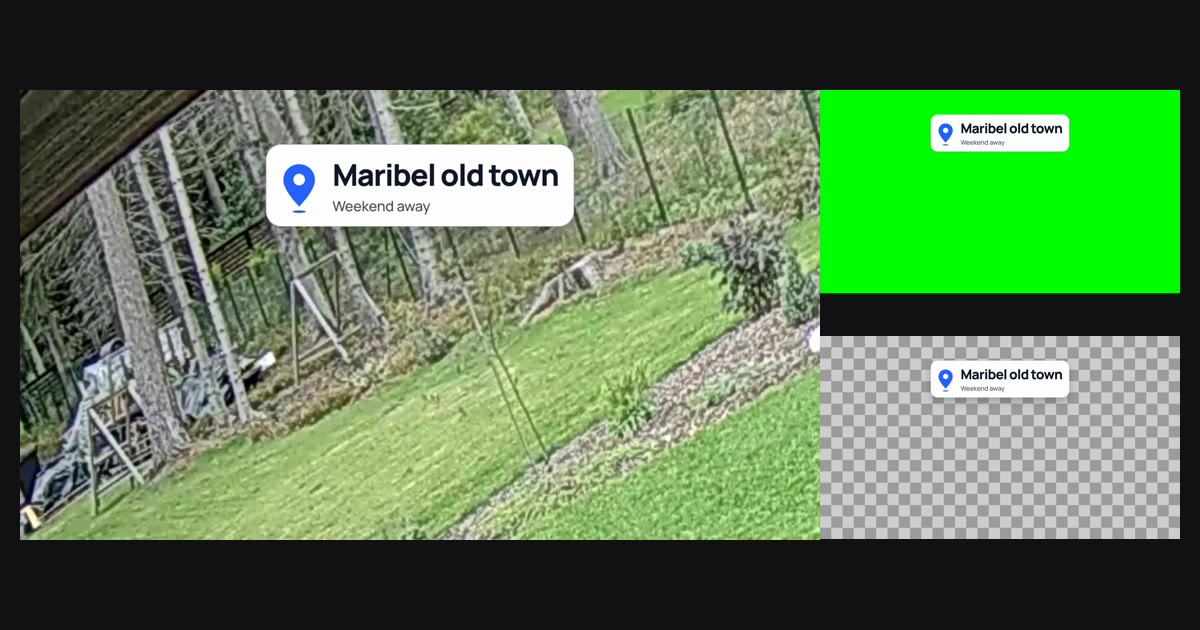
The footage is the first 12 seconds of a CC0 clip of a windthrow in Tammneeme, Estonia, by Sillerkiil, with synthetic speech made by the macOS say command so the file has an audio track. The overlay is the free City stop location tag.
If Modisign is not connected to your assistant yet, follow the setup in how to edit a local video with Claude first. This post starts from a working connection.
How do you get from a sentence to an overlay file?
- Check the setup. Run
npx -y @modisign/mcp doctorin a terminal. Ours reportednode_ok: true, FFmpeg 7.1.1,The private render browser is ready.,reachable: trueandsigned_in: false. - Ask for the free version first. For example: "Find the free location tag overlay, show me what I can change, and tell me whether my changes stay free." The assistant calls
list_overlayswith{"family": "location-tag", "free_only": true}. Ours returned one preset,location-tag/city-stop, withfree: trueand its editor link. Withoutfree_only, the family's other presets came back withfree: false. - Inspect the fields.
get_overlayfor that preset listed the 16:9, 9:16, 4:5 and 1:1 aspects, a 3.5-second duration, six looks, and each field with its limit: Place (default "Maribel old town", up to 24 characters), Detail (default "Weekend away", up to 32), colours, Layout, position and size. Each field says whether the current layout uses it. - Configure it.
configure_overlayreturns a configuration and a tier. The unchanged preset at"aspect": "16x9"came backtier: "free". When we also set an unused custom position, it stayed free and the reply said: "Kept but not used by this overlay layout: position_custom. They have no effect on this render." When we set Place to "Tammneeme, Estonia", the same call came backtier: "pro". - Render the standalone file.
render_overlayreturns a job id at once.job_statusthen reportedqueued,renderinganddone, with the saved path, size and duration. Withoutoutput_dir, our file went to~/Movies/Modisignon the Mac. - Or put it on your clip. "Put that tag on /Users/me/Movies/windthrow.mp4 at 4 seconds and save it as windthrow-tag.mp4." This is one
add_overlay_to_videocall, shown below. - Check the file. Scrub to the start time. If the overlay is late, early or covers something, ask for a different start and render again; your earlier file is kept.
This is the composite request we sent, with our real paths replaced:
{
  "video_path": "/Users/me/Movies/windthrow.mp4",
  "configuration": "/overlays/location-tag?aspect=9x16&look=blue-on-white",
  "start_seconds": 4,
  "output_path": "/Users/me/Movies/windthrow-tag.mp4"
}
We passed the catalog's 9:16 configuration on purpose. The reply already carried "aspect": "16x9": the tool picks the supported aspect nearest to your video and checks that version again. Paths must be full paths on your computer.
What did the files contain?
We opened every file with ffprobe and decoded frames.
| Request | Saved file | What we measured |
|---|---|---|
render_overlay, default format |
Green-screen MP4, 135 KB | 1920x1080 H.264, 30 fps, 105 frames, 3.5 s, no audio, solid green around the tag |
"format": "webm" |
VP9 WebM, 181 KB | Decoded with alpha: fully transparent (0) around the tag, opaque (255) on the card |
"format": "mov" |
ProRes 4444 MOV, 18 MB | Same alpha result, in a much larger file |
add_overlay_to_video, start 4 s |
H.264 MP4, 3.0 MB | 1280x720 at 30 fps, 360 frames, 12.0 s, stereo AAC at 48 kHz |
The composite kept the source's size and length, and its audio measured the same average loudness as the source, -20.5 dB. The tag appeared at about 4.0 seconds and was gone by 7.4 seconds, which matches a 3.5-second overlay starting at 4. The job went through queued, rendering, compositing and done in about 23 seconds on a busy test machine.
Which standalone file you need depends on your editor. Our green-screen versus transparent guide explains the trade-off. A composite avoids the question, because nothing needs keying.
Which parts are free, and which need Pro?
According to the MCP page, every free overlay renders as it is without an account, as green-screen MP4 or transparent MOV or WebM. Our signed-out test matched that, including the aspect change.
| Request | Result signed out |
|---|---|
| Unchanged free preset, any format, background or aspect | Rendered |
| Unchanged free preset on a local video | Rendered |
| Free preset with your own text, look or colours | Refused: needs Pro |
| Any Pro preset | Needs Pro (not rendered in our test) |
The refusal came before any job existed and read: "This overlay configuration needs Pro. Sign in with the login tool or run npx -y @modisign/mcp login, then retry (upgrade at https://modisign.app/pricing if the account is not Pro)." Pro costs $9 a month plus tax.
We did not approve a sign-in, so the signed-in path is untested. As documented, login gives you a link and a short code to approve in your browser, and the code expires after ten minutes. Connected computers appear on your account page, where you can disconnect one, and npx -y @modisign/mcp logout signs this computer out. Pro overlay renders also try to add a history entry to your account.
What stays on your computer?
Your video and its audio do not leave your computer. Modisign receives the overlay configuration, including any text you typed into it, to check whether the render is free. Your assistant provider sees more: your prompt, the file paths and every tool result, under its own policy, as the MCP page states.
What goes wrong, and how do you fix it?
| Problem | What we saw | Fix |
|---|---|---|
| Overlay ends after the video | "start_seconds must be between 0 and 8.5 seconds so the overlay fits in the video." | Ask for an earlier start. The limit is video length minus overlay length |
| Video longer than 60 seconds | "This video exceeds 60 seconds. Use Studio for longer or multi-clip edits" | Trim it first, or use edit_video or Studio |
| Text too long or aspect unsupported | "Invalid MCP input" with the field and its allowed values | Shorten the text or pick a listed aspect |
| A change "has no effect" | The value is listed under inactive edits | Choose the layout or option that uses it |
| Refusal that mentions Pro | Your own text or look | Render the unchanged preset, or sign in with a Pro account |
A -2 file appears |
A file already had that name | Expected: our second render saved windthrow-tag-2.mp4 and left the first file alone |
| Render takes too long | job_status still rendering |
cancel_job moved our job to canceled and left no file |
| "Unknown job_id" | The server process restarted | Jobs live only while the server runs. Ask again |
Where should the overlay go in your video?
These are suggestions, not test results. Put a location tag in the first seconds of the shot it describes, so it reads as a caption for that place, and keep it clear of the platform's buttons using the safe-zone guide. Pick a start that leaves the whole animation inside the clip, or the tool refuses it. If you want the same element on a timeline with other clips, ask for the standalone file and place it yourself, for example with the CapCut green-screen steps.
What are the limits?
The composite takes one local video up to 60 seconds and writes an H.264 MP4 with audio, with the long side capped at 1920 pixels. We tested one 16:9 clip, one overlay family and three standalone formats on a Mac, not Windows or Linux, not a vertical video, and not an import of the WebM or MOV into another editor. Free designs are licensed for your own channels; client work and ads need Pro under the licence terms. Browse more location tag overlays or the full overlay catalog to pick a different element.
Frequently asked questions
Can Claude change the text on a free overlay?
Claude can configure any text, but a free preset only renders as it is. In our test, changing the place name turned the configuration into Pro, and the signed-out render was refused with a sign-in message. Format, background and aspect stayed free.
Does Claude see my video?
No. The video is read and composited on your computer, and the tools return only facts such as the saved path, size and duration. Your assistant provider does see your prompt, the file paths and every tool result.
Which format should I ask for?
Ask for MP4 if your editor removes green backgrounds, WebM or MOV if it imports transparency. If you only need the overlay on one clip under 60 seconds, ask for the composite instead and skip keying altogether.
Can I add an overlay to a video longer than 60 seconds?
Not with add_overlay_to_video. It refused our 65-second file and pointed to Studio. For longer or multi-clip edits, use edit_video or Studio, which handle up to 180 seconds.
Related reading


Sources and test details
- Modisign MCP needs Node 22+ and FFmpeg with ffprobe, downloads a roughly 100-120 MB render browser on first render, works in Claude Desktop, Claude Code, ChatGPT desktop, Codex, Cursor and VS Code, renders every free overlay without an account as green-screen MP4 or transparent MOV or WebM, sends Modisign overlay text and settings but not media, lets the assistant provider see prompts, tool arguments, results and local paths, and signs in with a code you approve that you can disconnect from your account. — accessed
- Modisign Pro costs $9 a month plus tax. — accessed
- The test footage, Windthrow in Tammneeme, Estonia (2020) by Sillerkiil, is a 17-second 1280x720 clip dedicated to the public domain under CC0 1.0. — accessed
Tested in Modisign MCP (npm package @modisign/mcp) Published package 0.6.0, Modisign site as of October 2026 on macOS on Apple silicon with Node 24 and FFmpeg 7.1.1, driven by a scripted MCP client over stdio, signed out: On October 25 ran doctor, then list_overlays with family location-tag and free_only (one result, City stop), get_overlay and configure_overlay: the unchanged preset at 16:9 came back free, an unused custom value was kept and reported as an inactive edit, and our own place text came back Pro. Rendered the free preset as green-screen MP4 (1920x1080 H.264, 30 fps, 105 frames, 3.5 s), VP9 WebM with alpha and ProRes 4444 MOV with alpha (both checked by decoding the alpha channel). The edited configuration was refused before any job with a sign-in message.
Tested in Modisign MCP (npm package @modisign/mcp) Published package 0.6.0, Modisign site as of October 2026 on macOS on Apple silicon with Node 24 and FFmpeg 7.1.1, driven by a scripted MCP client over stdio, signed out: Called add_overlay_to_video on a 12-second 1280x720 clip with synthetic speech at a 4-second start. The tool chose 16:9 and the job went queued, rendering, compositing, done in about 23 seconds. The MP4 was 1280x720 H.264 at 30 fps, 360 frames, 12.0 s, with stereo AAC at 48 kHz and the same measured loudness as the source; frames showed the tag from about 4.0 s until 7.4 s. A second call with the same output path saved a -2 copy. A start of 10 s and a 65-second video were refused, and cancel_job stopped a running render with no file left.
Found an error or a changed control? support@modisign.app.